Convert any text to lifelike speech using Amazon Polly
Loading likes…
We will see how we can use amazon web services, specifically amazon polly to convert any text into a speech, and save it into a MP3 file.
Key idea — Polly is a cloud call, not a local model. You never run a speech model on your own machine. boto3 sends your text (plus a voice and an engine) to Amazon Polly over the internet; Polly synthesizes the audio and streams the bytes back, which you write to an .mp3. So the whole job comes down to three ingredients: credentials (who you are), a voice/engine (how it should sound), and the synthesize_speech call (the request itself).
What is Amazon Polly?
Amazon Polly is, as you can guess, amazon’s cloud service that converts text into lifelike speech. It can be used by developer to build applications that increase engagement and accessibility. In this post, we will see how we can use it to synthesize the superior natural speech with high pronunciation accuracy.
Create an account on AWS
Amazon Polly is part of AWS or Amazon Web Services, so you are going to need to create an account first of all in order for you to access Amazon Polly. You can create an account on AWS at this link, and then follow the instructions.
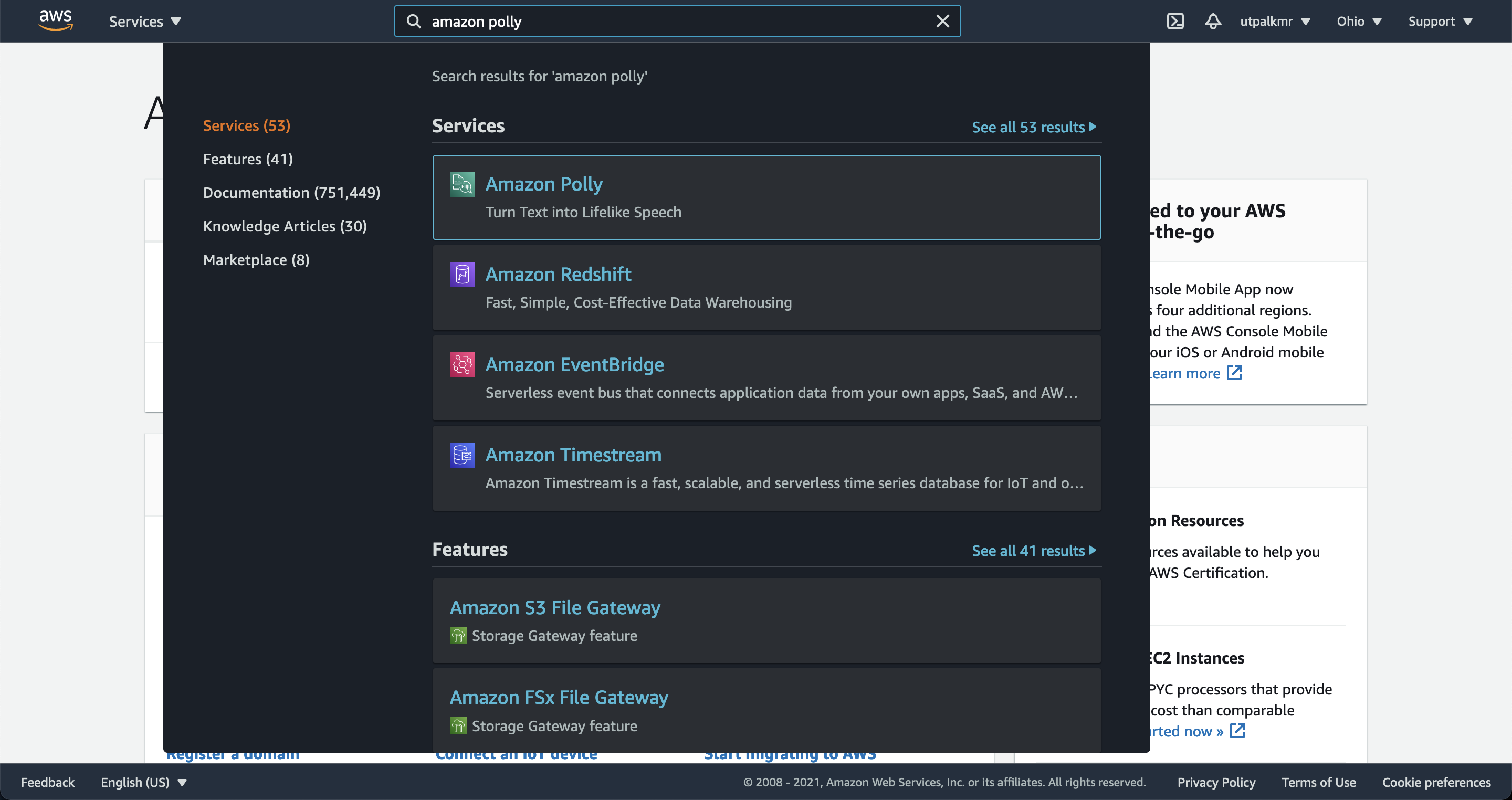
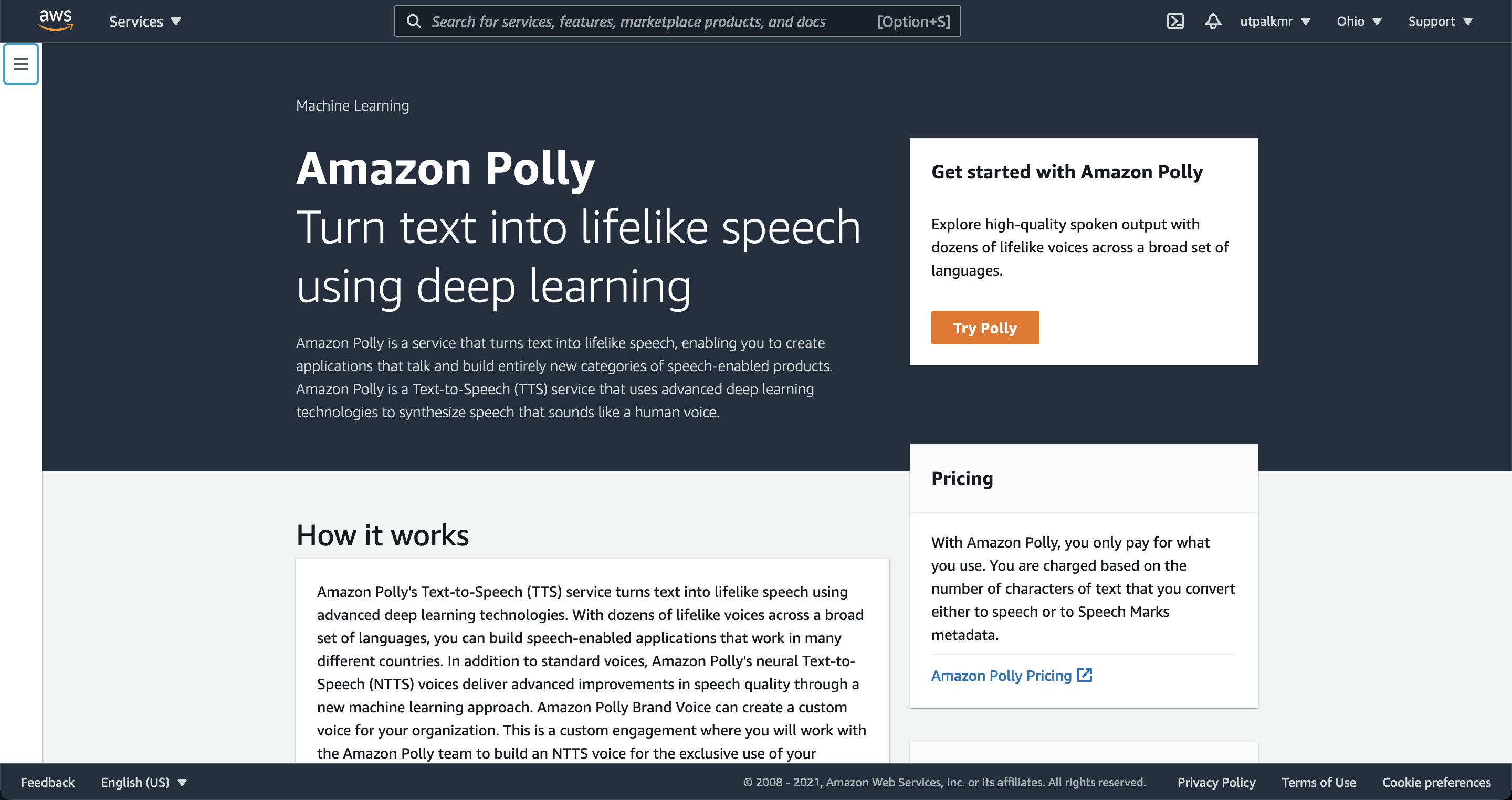
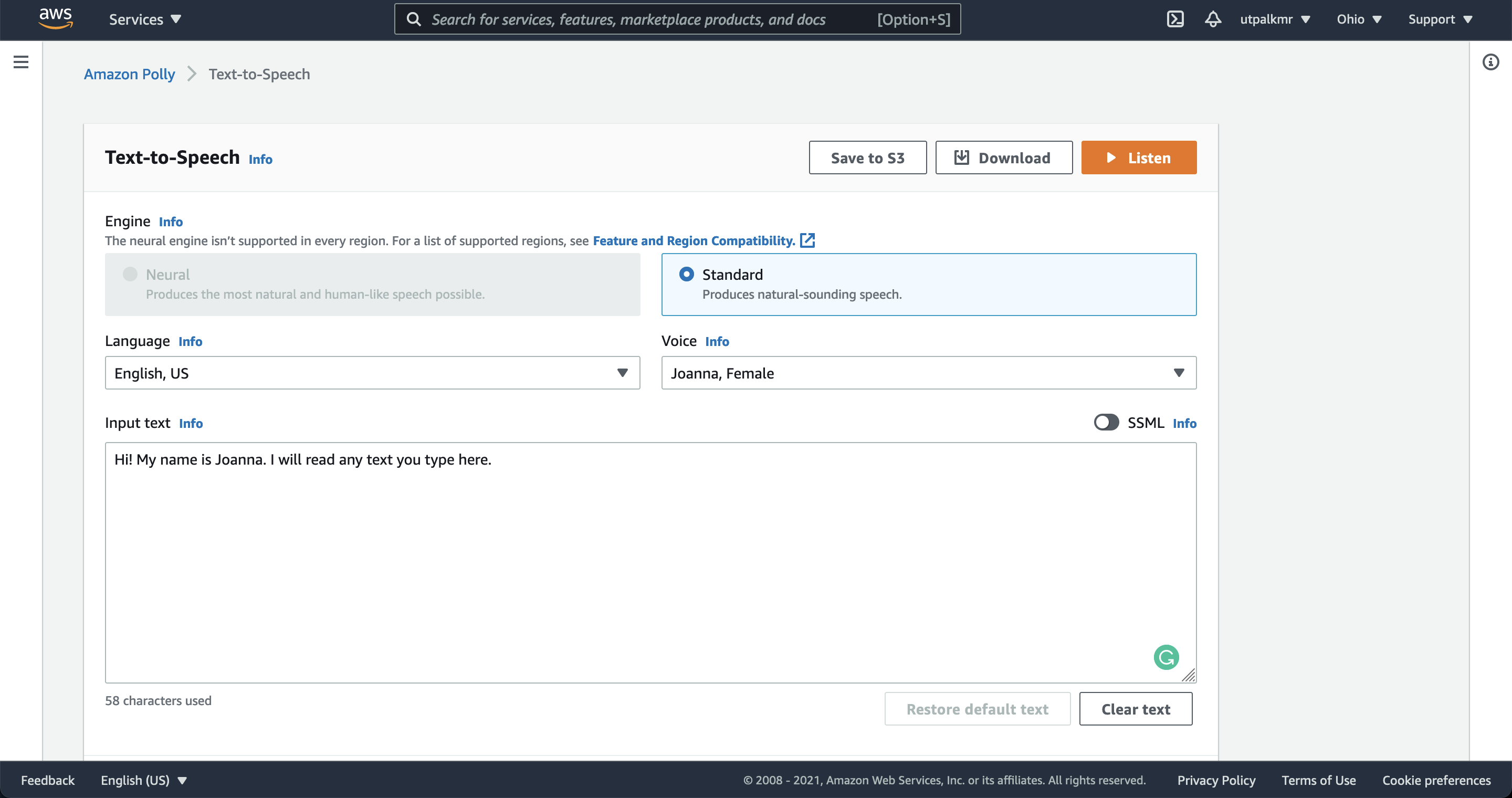
After you made an account, you can quickly try the Amazon polly by finding “Amazon Polly” in the search box, and then “Try Amazon Polly”. Type or paste some text into the input box. The choose “Standard” or “Neural” for the engine. You can also select different language and voice. To listen to the speech immediately, choose Listen. In addition, you can also download the MP3 file.
Polly now has four engines, not two. When this post was written the choices were Standard and Neural. Amazon has since added Long-form (2023, tuned for articles and long passages) and Generative (the most human-like, conversational voices). In code you pick one with the Engine argument to synthesize_speech (e.g. Engine="neural"); if you omit it, Polly defaults to standard. Each engine supports a different set of voices, so check that your chosen VoiceId is available for that engine.
Next, we want to write a Python script to automate the reading of any text from your local computer. This however requires the internet connectivity.
Create a user with admin privileges
To use the services in AWS, such as Amazon Polly, require that you provide credentials when you access them. So, you need to create an IAM user for yourself. You can create one using the IAM console (search in the search box “IAM”). Then follow the intructions on the screen to create a new user and give it administrator privileges. For details, see this link.
Least-privilege beats full admin. Granting a script administrator rights is convenient but risky — if the keys leak, the whole account is exposed. For a text-to-speech task, attach the AWS-managed AmazonPollyReadOnlyAccess policy (or a small custom policy allowing just polly:SynthesizeSpeech) instead. Same result, far smaller blast radius.
Set up the Amazon Command-Line-Interface (CLI)
Follow the steps here to install the Amazon’s command line interface: Installing the AWS CLI. I recommend installing the version 2.
After you successfully install the aws command line interface, the you should be able to run the following command:
aws --version
This returns in my case ->
aws-cli/2.3.0 Python/3.8.8 Darwin/20.6.0 exe/x86_64 prompt/off
Now, you can run the command:
aws sts get-caller-identity
This command tried to find out who you are. Most likely (if you haven’t configured your credentials locally), it is going to thow error that Unable to locate credentials. You can configure credentials by running "aws configure"..
You can run the command aws configure to configure your credentials.

Verify for the availability of Amazon Polly in your CLI
You can verify the availability of Amazon Polly by typing the following help command at the AWS CLI command prompt.
aws polly help
If a description of Amazon Polly and a list of valid commands appears in the AWS CLI window, Amazon Polly is available in the AWS CLI and can be used immediately.
If you are prompted error, then follow the steps here.
Convert your first text to speech using aws command line
aws polly synthesize-speech \
    --output-format mp3 \
    --voice-id Matthew \
    --text 'Hope you like earthinversion. Please share it with your friends and colleagues' \
    earthinversion.mp3
This one uses the voice id “Matthew”. You can look for other voice types using the command:
aws polly describe-voices
Python script to convert text to speech
Now since we have aws command line interface installed, we can install the python library boto3 and can simply run the script.
To install boto3
pip install boto3
Python script to convert text input
from boto3 import Session
from botocore.exceptions import BotoCoreError, ClientError
import sys

# Create a client using the credentials and region defined in the [adminuser]
# section of the AWS credentials file (~/.aws/credentials).
session = Session(profile_name="default")
polly = session.client("polly")

try:
    # Request speech synthesis
    response = polly.synthesize_speech(Text="Hello world! This is earthinversion speaking", OutputFormat="mp3",
                                        VoiceId="Matthew")
except (BotoCoreError, ClientError) as error:
    # The service returned an error, exit gracefully
    print(error)
    sys.exit(-1)

# Access the audio stream from the response
if "AudioStream" in response:
    body = response['AudioStream'].read()

    file_name ='speech.mp3'

    with open(file_name, 'wb') as file:
        file.write(body)

else:
    sys.exit(-1)
Notice how the code mirrors the diagram above: build a polly client from your credentials, call synthesize_speech with the text and VoiceId, then read response['AudioStream'] and write those bytes to speech.mp3. The try/except around the call is important — network and permission failures come back as BotoCoreError/ClientError, and you want to fail loudly rather than write an empty file.
Quick check: What is stored in response['AudioStream']?
Python script to convert long text to speech
"""
Synthesizes speech from the input string of text or ssml.
Utpal Kumar, Oct, 2021
"""
from boto3 import Session
from botocore.exceptions import BotoCoreError, ClientError
import sys
from os import path
from pydub import AudioSegment
import os

import argparse

info_string = ''' by Utpal Kumar, IESAS, 2021/08
'''

PARSER = argparse.ArgumentParser(
    description=info_string, epilog="")


def main(textfilename, wavOut="test.wav", tmpOutMp3File='test.mp3'):
    if os.path.exists(tmpOutMp3File):
        os.remove(tmpOutMp3File)

    # Create a client using the credentials and region defined in the [adminuser]
    # section of the AWS credentials file (~/.aws/credentials).
    session = Session(profile_name="default")
    polly = session.client("polly")

    # Set the text input to be synthesized
    with open(textfilename) as bt:
        textdata = bt.readlines()
    # print(allText)
    print('Total lines: ', len(textdata))

    for N in range(len(textdata)):
        allText0 = textdata[N]
        print(f"{N+1}/{len(textdata)}", allText0)
        # Request speech synthesis
        response = polly.synthesize_speech(Text=allText0, OutputFormat="mp3",
                                        VoiceId="Matthew")
        body = response['AudioStream'].read()
        # The response's audio_content is binary.
        with open(tmpOutMp3File, "ab") as out:
            # Write the response to the output file.
            out.write(body)

    # convert wav to mp3
    sound = AudioSegment.from_mp3(tmpOutMp3File)
    sound.export(wavOut, format="wav")


if __name__ == "__main__":
    PARSER.add_argument("-f", '--textfilename', type=str, help="textfilename")
    PARSER.add_argument("-o", '--waveout', type=str,
                        help="wav output", default='test.wav')
    PARSER.add_argument("-m", '--tmpOutMp3File',
                        type=str, help="tmpOutMp3File", default='test.mp3')

    args = PARSER.parse_args()
    main(args.textfilename, wavOut=args.waveout,
         tmpOutMp3File=args.tmpOutMp3File)
This script reads a text file line by line, synthesizes each line, appends the audio to a temporary MP3, and finally uses pydub to export a WAV. Splitting the request up is exactly what you’d do for a long document, because a single synthesize_speech call is capped (3000 billed characters per request at the time of writing) — so batching by line keeps each request within the limit.
pydub on Python 3.13+ needs one extra install. pydub relies on the standard-library audioop module, which was removed in Python 3.13 (PEP 594). On 3.13+ the import fails with ModuleNotFoundError: No module named 'pyaudioop'. The fix is to install the drop-in backport: pip install audioop-lts. (pydub also needs ffmpeg on your PATH for MP3/WAV conversion.)
Save the above script into a file named texttospeechaws.py. To use the above script, parse the input file using the f flag:
# python texttospeechaws.py -f mytextfile.txt
For more details on the use, run the command:
python texttospeechaws.py -h
Recap
- Polly runs in the cloud.
boto3ships your text up, Polly returns audio bytes inresponse['AudioStream'], and you write them to a file — no local speech model. - Three ingredients: credentials (via
aws configure/ an IAM user), a voice + engine (VoiceId,Engine), and thesynthesize_speechcall. - Pick a modern engine. Add
Engine="neural"(orlong-form/generative) for far better quality than the defaultstandard. - Batch long text. Requests are character-capped, so split a document into pieces (e.g. per line) and concatenate the audio.
- Mind two modern gotchas: prefer least-privilege IAM over full admin, and on Python 3.13+ install
audioop-ltssopydubimports.
Where to go next
synthesize_speech(boto3) reference: boto3 Polly synthesize_speech- Amazon Polly voice engines: docs.aws.amazon.com/polly/latest/dg/voice-engines-polly.html
- Available voices: docs.aws.amazon.com/polly/latest/dg/available-voices.html
Found this article useful?
Loading likes…
Disclaimer of liability
The information provided by the Earth Inversion is made available for educational purposes only.
Whilst we endeavor to keep the information up-to-date and correct. Earth Inversion makes no representations or warranties of any kind, express or implied about the completeness, accuracy, reliability, suitability or availability with respect to the website or the information, products, services or related graphics content on the website for any purpose.
UNDER NO CIRCUMSTANCE SHALL WE HAVE ANY LIABILITY TO YOU FOR ANY LOSS OR DAMAGE OF ANY KIND INCURRED AS A RESULT OF THE USE OF THE SITE OR RELIANCE ON ANY INFORMATION PROVIDED ON THE SITE. ANY RELIANCE YOU PLACED ON SUCH MATERIAL IS THEREFORE STRICTLY AT YOUR OWN RISK.
Leave a comment