Build a Multilingual Local Voice Journal App with FastAPI and Whisper (Beginner Guide)
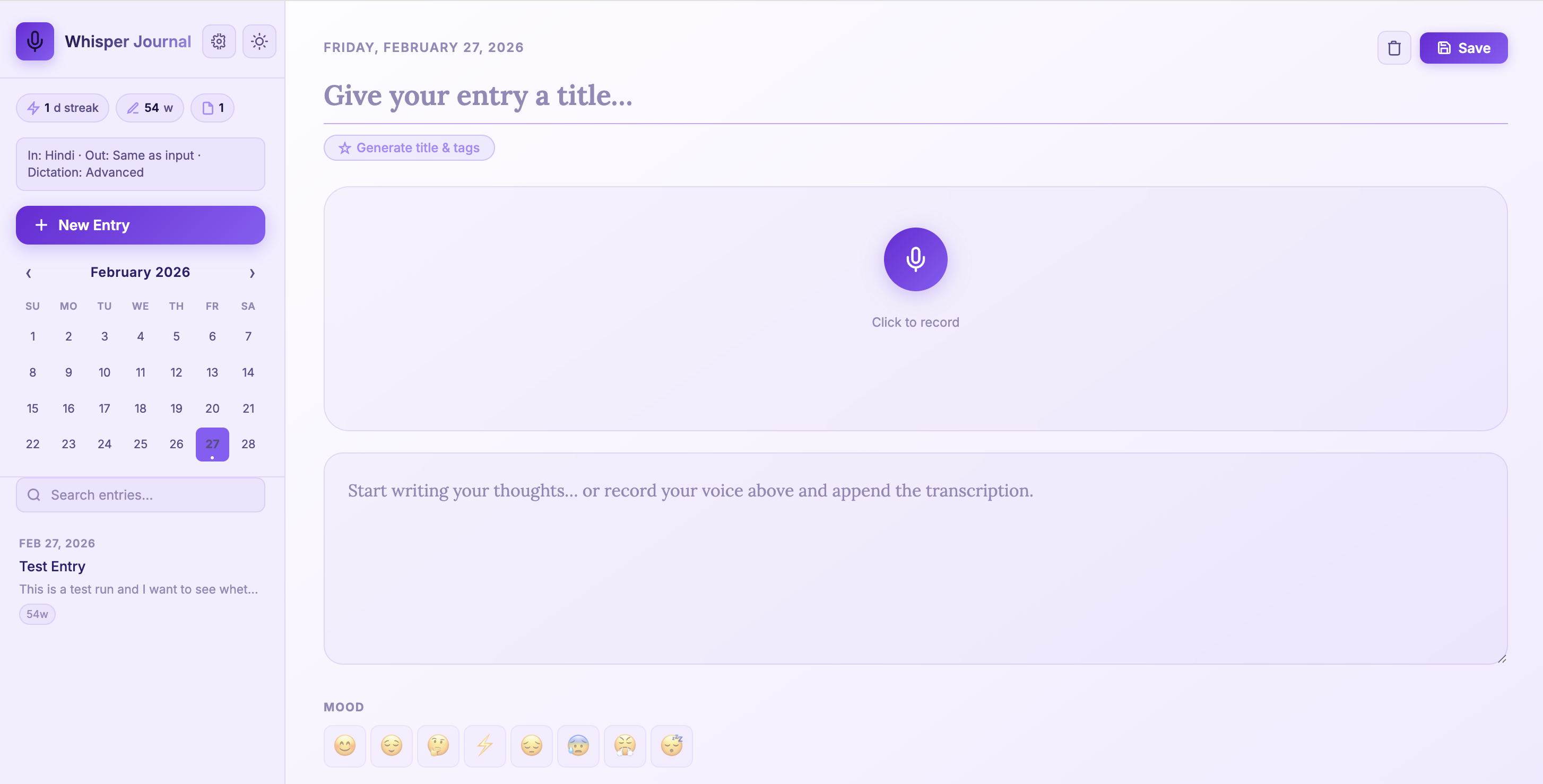
A beginner-friendly walkthrough to build and run Whisper Journal with multilingual dictation, local Whisper transcription, AI-assisted title/tag generation, and local SQLite storage.
In this post, I walk through Whisper Journal for beginners.
Repository: whisper-jouraling-app
The app includes:
- Multilingual dictation (
en,hi,zh) - Dictation quality levels (
basic,enhanced,advanced) - AI-assisted title and tag generation
- Settings UI for language and dictation defaults
- Better microphone permission handling on macOS
The core idea is still local-first: transcription and journal storage remain on your own machine.
Motivation: Why Build This Type of App?
I wanted to solve a simple problem: thoughts come faster than typing.
In practice, voice journaling apps are useful because they:
- Reduce friction for daily journaling and reflection
- Capture ideas while walking, commuting, or cooking
- Keep private notes local instead of sending them to cloud services
- Support multilingual thinking (for example, switching between English and Hindi naturally)
- Turn unstructured voice notes into searchable text
From a software learning perspective, this kind of project is valuable because one app combines:
- Browser media APIs
- Backend API design
- Local AI model inference
- Persistent storage and retrieval
- UX tradeoffs around privacy, speed, and accuracy
How People Can Use Apps Like This
Here are practical usage patterns that make these apps stick:
- Morning brain dump: record 3 minutes and auto-generate title/tags.
- End-of-day reflection: track mood and short wins.
- Weekly review: search entries by tags and calendar date.
- Idea inbox: capture startup, research, or writing ideas before they disappear.
- Language practice journal: dictate in one language and keep output in another when available.
- Field notes: add quick photos plus voice notes during travel or site visits.
Imaginative Ideas You Can Build Next
If you want to evolve this app beyond basic journaling, here are creative directions:
- Dream-to-design log: capture dream fragments after waking, then auto-cluster recurring symbols and themes.
- Scientist field companion: voice notes + images + GPS metadata for real-world observation journals.
- Memory atlas: convert entries into a personal map of places, events, and emotional tone over time.
- Emotional weather dashboard: visualize mood streaks as seasonal trends and trigger reflective prompts.
- Conversation rehearsal coach: practice interviews or talks, then tag filler words and confidence phrases.
- Family story archive: record elders’ stories, auto-tag people/locations, and build a searchable oral-history timeline.
- Research scratchpad: convert lab or coding voice notes into dated experiment logs with keyword extraction.
- Language mirror mode: speak in Hindi/Chinese and keep aligned English summaries for study revision.
- Quiet productivity coach: detect repeated procrastination themes and suggest focused next actions.
- Creative writer’s seed vault: store fragments of scenes, dialogue, and plot hooks, then surface related ideas automatically.
What You Need Before You Start
- Python
3.10+ ffmpeg(required by Whisper)- Git
- A microphone
On macOS:
brew install ffmpeg
Step 1: Clone and Install
git clone https://github.com/earthinversion/whisper-jouraling-app.git
cd whisper-jouraling-app
make install
What make install does:
- Creates
.venv - Upgrades
pip - Installs dependencies from
requirements.txt - Creates
data/uploadsdirectory for images
Main dependencies:
fastapifor API and web routesuvicorn[standard]as ASGI serveropenai-whisperfor local transcriptionpython-multipartfor file uploadsjinja2for server-rendered HTML templateyakefor local keyword extraction
Step 2: Run the App
make run
Then open:
http://127.0.0.1:8000
Useful commands during development:
make dev     # foreground + auto-reload
make status  # check running state
make logs    # tail app log
make stop    # stop background server
Project Structure
whisper-jouraling-app/
├── main.py               # FastAPI app, Whisper + metadata + SQLite logic
├── templates/index.html  # Main UI + settings view
├── static/js/app.js      # Client logic (recording, settings, metadata actions)
├── static/css/style.css  # Styling and theme behavior
├── data/                 # Local database and uploaded images
├── Makefile              # Install/run/dev lifecycle commands
└── requirements.txt      # Python dependencies
This layout is still beginner-friendly because backend and frontend logic are centralized in two clear files (main.py and static/js/app.js).
Backend Walkthrough
1. FastAPI + storage setup
main.py initializes directories, static file mounts, templates, and the SQLite path:
app = FastAPI(title="Whisper Journal")
BASE_DIR = Path(__file__).parent
DATA_DIR = BASE_DIR / "data"
UPLOADS_DIR = DATA_DIR / "uploads"
DB_PATH = DATA_DIR / "journal.db"
2. Whisper model selection by dictation level
Instead of a single fixed model, the app maps dictation level to Whisper model:
DICTATION_LEVEL_TO_MODEL = {
    "basic": "base",
    "enhanced": "small",
    "advanced": "medium",
}
It also enforces language-specific minimums for better accuracy:
- Hindi uses at least
medium - Chinese uses at least
small
This is a practical improvement for multilingual journaling.
3. Transcription endpoint now accepts settings
/api/transcribe now receives:
audiolanguageoutput_languagedictation_level
@app.post("/api/transcribe")
async def transcribe(
    audio: UploadFile = File(...),
    language: Optional[str] = Form(None),
    output_language: Optional[str] = Form(None),
    dictation_level: Optional[str] = Form(None),
):
Important behavior in this route:
- Validates supported languages and dictation levels
- Applies language prompts (for punctuation style)
- Uses translation only where Whisper supports it (to English)
- Adds post-processing punctuation for Hindi when needed
4. Metadata generation endpoint
The new endpoint POST /api/generate-metadata creates title + tags from content.
Generation strategy:
- Try local
ollama(llama3.2:1b) if available - Fall back to local extraction (
_extract_title+ YAKE/frequency)
This gives good quality when ollama is running, while still working fully offline without it.
5. SQLite schema (unchanged core design)
The app stores entries in a single table with metadata:
CREATE TABLE IF NOT EXISTS entries (
    id          INTEGER PRIMARY KEY AUTOINCREMENT,
    title       TEXT    DEFAULT '',
    content     TEXT    DEFAULT '',
    date        TEXT    NOT NULL,
    created_at  TEXT    NOT NULL,
    updated_at  TEXT    NOT NULL,
    mood        TEXT    DEFAULT '',
    tags        TEXT    DEFAULT '[]',
    images      TEXT    DEFAULT '[]',
    word_count  INTEGER DEFAULT 0
)
This is still a solid beginner schema before moving to multi-table designs.
Frontend Walkthrough
The frontend is still vanilla JavaScript in one file, but now includes a settings panel and metadata actions.
1. Settings-driven transcription
User settings are stored in localStorage (wj-settings) and applied to each transcription request:
- Input language (
en/hi/zh) - Output language (
same/en/hi/zh) - Dictation level (
basic/enhanced/advanced)
2. Recording flow
Recording still uses:
navigator.mediaDevices.getUserMedia({ audio: true })MediaRecorderFormDataupload to/api/transcribe
The payload now includes language and dictation settings in the same request.
3. Generate title and tags from content
Clicking Generate title & tags calls:
POST /api/generate-metadata- Fills empty title
- Appends non-duplicate tags
This is a useful beginner example of progressive enhancement: the journal works without this feature, but becomes faster to use with it.
End-to-End Data Flow
Microphone
  -> MediaRecorder (browser)
  -> settings-enriched FormData (language/output/dictation level)
  -> /api/transcribe (FastAPI)
  -> language-aware Whisper model selection
  -> transcription text
  -> /api/entries
  -> SQLite (data/journal.db)
  -> UI render (list, calendar, stats)
Metadata Flow
Journal content
  -> /api/generate-metadata
  -> try local ollama (if available)
  -> fallback to YAKE/local extraction
  -> title + tags returned
  -> prefill editor fields
API Reference
| Route | Method | Purpose |
|---|---|---|
/api/transcribe |
POST |
Audio transcription with language and dictation controls |
/api/open-microphone-settings |
POST |
Open macOS microphone settings page |
/api/generate-metadata |
POST |
Auto-generate title and tags |
/api/upload-image |
POST |
Save image attachments |
/api/entries |
GET/POST |
List and create entries |
/api/entries/{id} |
GET/PUT/DELETE |
Read/update/delete a single entry |
/api/stats |
GET |
Total entries, words, streak |
/api/dates |
GET |
Dates with entries for calendar highlights |
Disclaimer of liability
The information provided by the Earth Inversion is made available for educational purposes only.
Whilst we endeavor to keep the information up-to-date and correct. Earth Inversion makes no representations or warranties of any kind, express or implied about the completeness, accuracy, reliability, suitability or availability with respect to the website or the information, products, services or related graphics content on the website for any purpose.
UNDER NO CIRCUMSTANCE SHALL WE HAVE ANY LIABILITY TO YOU FOR ANY LOSS OR DAMAGE OF ANY KIND INCURRED AS A RESULT OF THE USE OF THE SITE OR RELIANCE ON ANY INFORMATION PROVIDED ON THE SITE. ANY RELIANCE YOU PLACED ON SUCH MATERIAL IS THEREFORE STRICTLY AT YOUR OWN RISK.