PyGMT: High-Resolution Topographic Map in Python (codes included)

A simple tutorial on how to plot high resolution topographic map using GMT tools in Python

Introduction

If you have been working in seismology, then you must have come across Generic Mapping Tools (GMT) software. It is widely used software, not only in seismology but across the Earth, Ocean, and Planetary sciences and beyond. It is a free, open-source software used to generate publication quality maps or illustrations, process data and make animations. Recently, GMT built API (Application Programming Interface) for MATLAB, Julia and Python. In this post, we will explore the Python wrapper library for the GMP API – PyGMT. Using the GMT from Python script allows enormous capabilities.

The API reference for PyGMT can be accessed from here and is strongly recommended. Although PyGMT project is still in completion, there are many functionalities available.

Step-by-step guide for PyGMT using an example

In this post, we will demonstrate the PyGMT implementation by plotting the topographic map of southern India. We will also plot some markers on the map.

Importing Libraries

The first thing I like to do is to import all the necessary libraries for the task. This keeps the code organized.

import pygmt

minlon, maxlon = 60, 95
minlat, maxlat = 0, 25

Define topographic data source

The topographic data can be accessed from various sources. In this snippet below, I listed a couple of sources.

#define etopo data file
# topo_data = 'path_to_local_data_file'
topo_data = '@earth_relief_30s' #30 arc second global relief (SRTM15+V2.1 @ 1.0 km)
# topo_data = '@earth_relief_15s' #15 arc second global relief (SRTM15+V2.1)
# topo_data = '@earth_relief_03s' #3 arc second global relief (SRTM3S)

Initialize the pyGMT figure

Similar to the matplotlib’s fig = plt.Figure(), PyGMT begins with the creation of Figure instance.

# Visualization
fig = pygmt.Figure()

Define CPT file

# make color pallets
pygmt.makecpt(
    cmap='topo',
    series='-8000/8000/1000',
    continuous=True
)

Plot the high resolution topography from the data source

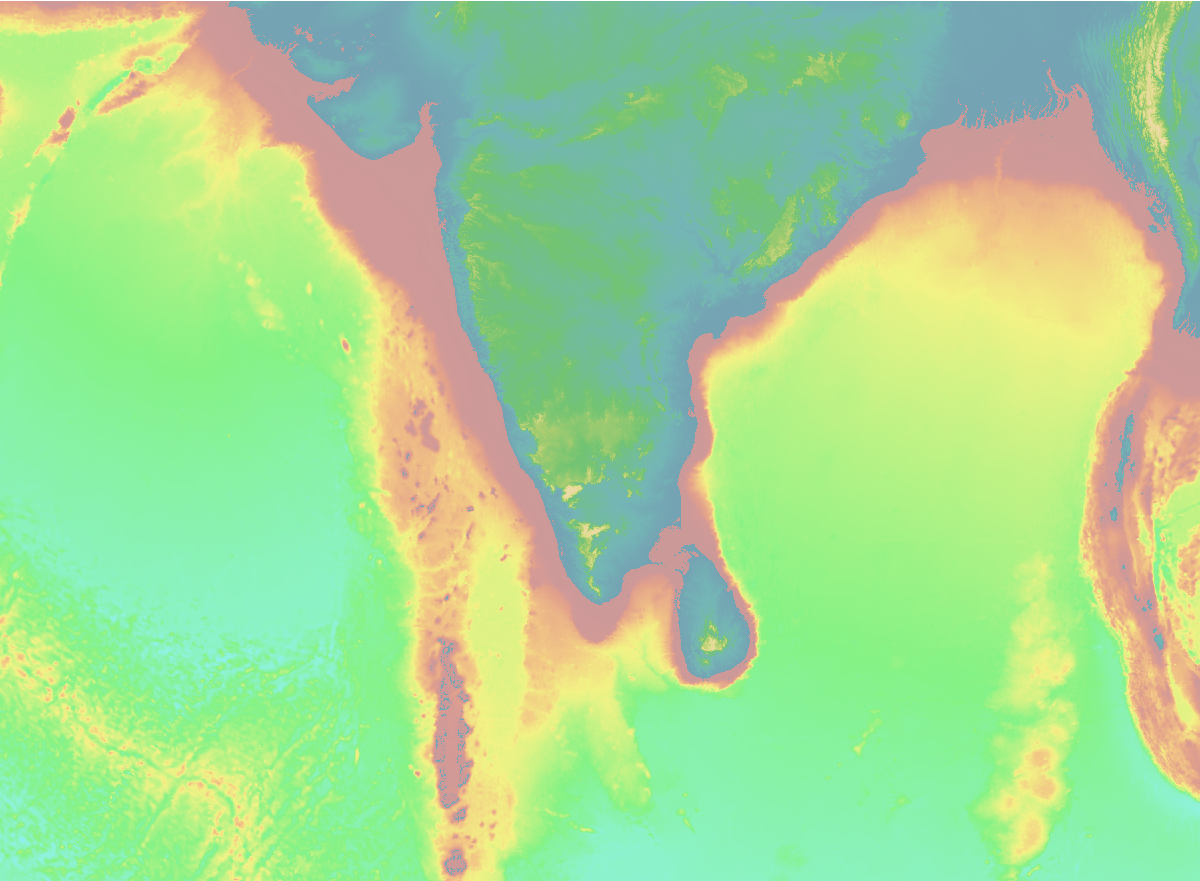
Now, we provide the topo_dataregion and the projection for the figure to plot. The region can also be provided in the form of ISO country code strings, e.g. TW for Taiwan, IN for India, etc. For more ISO codes, check the wikipedia page here. In this example, we used the projection of M4i, which specifies four-inch wide Mercator projection. For more projection options, check here.

#plot high res topography
fig.grdimage(
    grid=topo_data,
    region=[minlon, maxlon, minlat, maxlat],
    projection='M4i'
    )
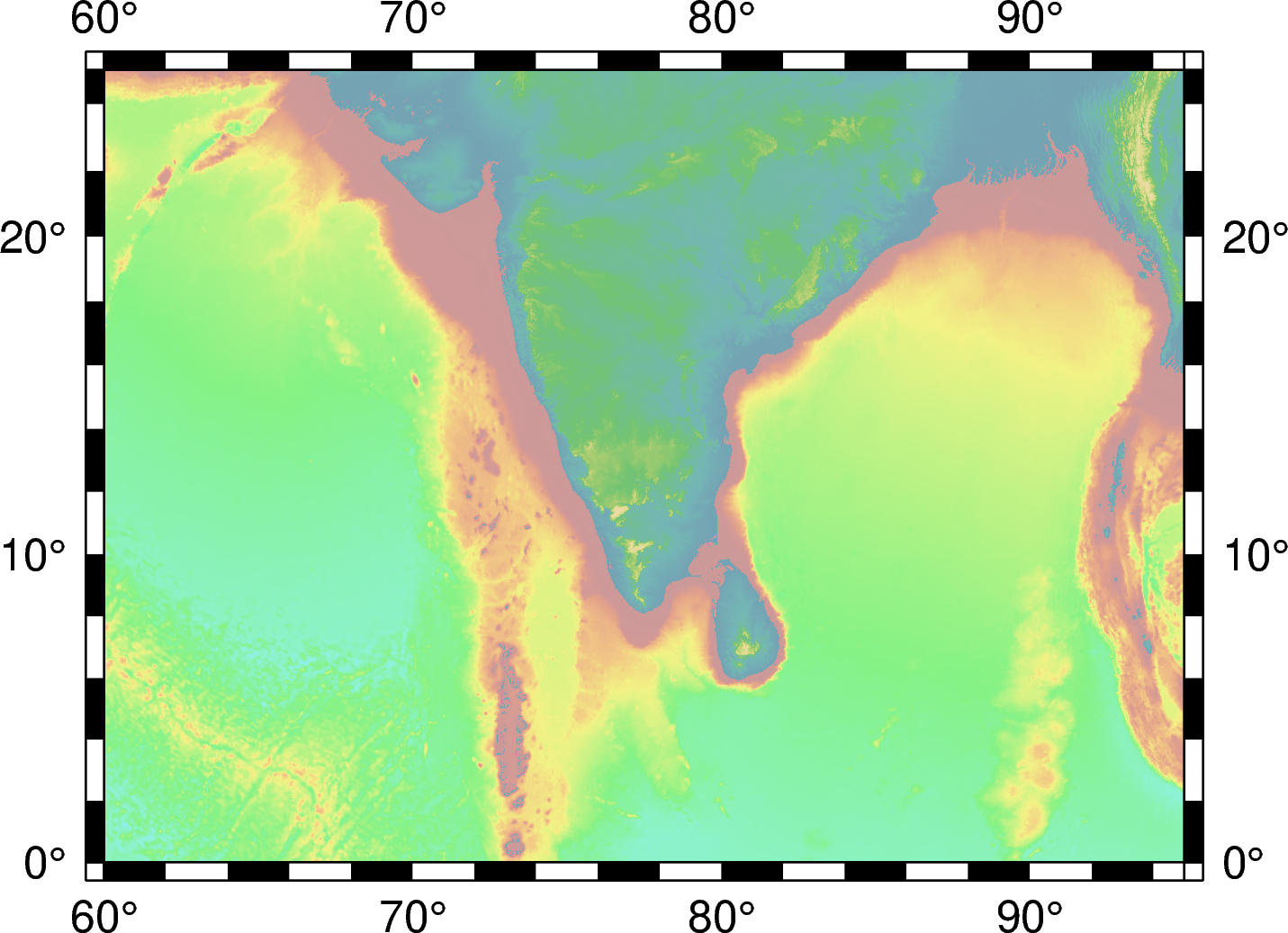
#plot high res topography
fig.grdimage(
    grid=topo_data,
    region=[minlon, maxlon, minlat, maxlat],
    projection='M4i',
    frame=True
    )
#plot high res topography
fig.grdimage(
    grid=topo_data,
    region=[minlon, maxlon, minlat, maxlat],
    projection='M4i',
    shading=True,
    frame=True
    )

Plot the coastlines/shorelines on the map

Figure.coast can be used to plot continents, shorelines, rivers, and borders on maps. For details, visit pygmt.Figure.coast.

fig.coast(
    region=[minlon, maxlon, minlat, maxlat],
    projection='M4i',
    shorelines=True,
    frame=True
    )

Plot the topographic contour lines

We can also plot the topographic contour lines to emphasize the change in topography. Here, I used the contour intervals of 4000 km and only show contours with elevation less than 0km.

fig.grdcontour(
    grid=topo_data,
    interval=4000,
    annotation="4000+f6p",
    limit="-8000/0",
    pen="a0.15p"
    )

Plot data on the topographic map

## Generate fake coordinates in the range for plotting
lons = minlon + np.random.rand(10)*(maxlon-minlon)
lats = minlat + np.random.rand(10)*(maxlat-minlat)

# plot data points
fig.plot(
    x=lons,
    y=lats,
    style='c0.1i',
    color='red',
    pen='black',
    label='something',
    )

We plot the locations by red cicles. You can change the markers to any other marker supported by GMT, for example a0.1i will produce stars of size 0.1 inches.

Plot colorbar for the topography

Default is horizontal colorbar

# Plot colorbar
fig.colorbar(
    frame='+l"Topography"'
    )

For vertical colorbar:

# For vertical colorbar
fig.colorbar(
frame='+l"Topography"',
position="x11.5c/6.6c+w6c+jTC+v"
)

We can define the location of the colorbar using the string x11.5c/6.6c+w6c+jTC+v+v specifies the vertical colorbar.

Output the figure to a file

Similar to matplotlib, PyGMT shows the figure by

# save figure
fig.show() #fig.show(method='external')

To save figure to png. PyGMT crops the figure by default and has output figure resolution of 300 dpi for png and 720 dpi for pdf. There are several other output formats available as well.

# save figure
fig.savefig("topo-plot.png", crop=True, dpi=300, transparent=True)

fig.savefig("topo-plot.pdf", crop=True, dpi=720)

If you want to save all formats (e.g., pdf, eps, tif) then

allformat = 1

if allformat:
    fig.savefig("topo-plot.pdf", crop=True, dpi=720)
    fig.savefig("topo-plot.eps", crop=True, dpi=300)
    fig.savefig("topo-plot.tif", crop=True, dpi=300, anti_alias=True)


Complete Script

import numpy as np 
import pygmt

np.random.seed(0)

minlon, maxlon = 60, 95
minlat, maxlat = 0, 25

## Generate fake coordinates in the range for plotting
lons = minlon + np.random.rand(10)*(maxlon-minlon)
lats = minlat + np.random.rand(10)*(maxlat-minlat)


#define etopo data file
topo_data = '@earth_relief_30s' #30 arc second global relief (SRTM15+V2.1 @ 1.0 km)


# Visualization
fig = pygmt.Figure()

# make color pallets
pygmt.makecpt(
    cmap='topo',
    series='-8000/8000/1000',
    continuous=True
)

#plot high res topography
fig.grdimage(
    grid=topo_data,
    region=[minlon, maxlon, minlat, maxlat], 
    projection='M4i',
    shading=True,
    frame=True
    )

# plot coastlines
fig.coast(
    region=[minlon, maxlon, minlat, maxlat], 
    projection='M4i', 
    shorelines=True,
    frame=True
    )

# plot topo contour lines
fig.grdcontour(
    grid=topo_data,
    interval=4000,
    annotation="4000+f6p",
    # annotation="1000+f6p",
    limit="-8000/0",
    pen="a0.15p"
    )

# plot data points
fig.plot(
    x=lons,
    y=lats, 
    style='c0.1i', 
    color='red', 
    pen='black', 
    label='something',
    )

## Plot colorbar
# Default is horizontal colorbar
fig.colorbar(
    frame='+l"Topography"'
    )


# save figure as pdf
fig.savefig("topo-plot.pdf", crop=True, dpi=720)

Plot Focal Mechanism on a Map

How would you plot the focal mechanism on a map? This can be simply done in GMT using the command psmeca. But PyGMT do not support psmeca so far. So, we use a workaround. We call the GMT module using the PyGMT’s pygmt.clib.Session class. This we do using the context manager with in Python.

import pygmt
import numpy as np

minlon, maxlon = 70, 100
minlat, maxlat = 0, 35

## Generate fake coordinates in the range for plotting
num_fm = 15
lons = minlon + np.random.rand(num_fm)*(maxlon-minlon)
lats = minlat + np.random.rand(num_fm)*(maxlat-minlat)

strikes = np.random.randint(low = 0, high = 360, size = num_fm)
dips = np.random.randint(low = 0, high = 90, size = num_fm)
rakes = np.random.randint(low = 0, high = 360, size = num_fm)
magnitudes = np.random.randint(low = 5, high = 9, size = num_fm)

#define etopo data file
topo_data = '@earth_relief_30s' #30 arc second global relief (SRTM15+V2.1 @ 1.0 km)


fig = pygmt.Figure()

# make color pallets
pygmt.makecpt(
    cmap='topo',
    series='-8000/11000/1000',
    continuous=True
)

#plot high res topography
fig.grdimage(
    grid=topo_data,
    region='IN', 
    projection='M4i',
    shading=True,
    frame=True
    )

fig.coast( region='IN',
    projection='M4i',
    frame=True,
    shorelines=True,
    borders=1, #political boundary
)

for lon, lat, st, dp, rk, mg in zip(lons, lats, strikes, dips, rakes, magnitudes):
    with pygmt.helpers.GMTTempFile() as temp_file: 
        with open(temp_file.name, 'w') as f:
            f.write(f'{lon} {lat} 0 {st} {dp} {rk} {mg} 0 0') #moment tensor: lon, lat, depth, strike, dip, rake, magnitude
        with pygmt.clib.Session() as session:
            session.call_module('meca', f'{temp_file.name} -Sa0.2i')

fig.savefig("fm-plot.pdf", crop=True, dpi=720)
Randomly generated focal mechanisms plotted on topographic map of India

Plotting interstation paths between two stations

The following script uses the sel_pair_csv file for the coordinates of the pairs of stations. The sel_pair_csv file is a csv file that is formatted like:

   stn1     stlo1    stla1  stn2     stlo2    stla2
0  A002  121.4669  25.1258  B077  120.7874  23.8272
1  A002  121.4669  25.1258  B117  120.4684  24.1324
2  A002  121.4669  25.1258  B123  120.5516  24.0161
3  A002  121.4669  25.1258  B174  120.8055  24.2269
4  A002  121.4669  25.1258  B183  120.4163  23.8759

df_info = pd.read_csv(sel_pair_csv, names=["stn1", "stlo1", "stla1", "stn2", "stlo2", "stla2"], header=None)
event_fig = os.path.join("." , "interstation_map.png")
plot_map = 1
if plot_map:
    topo_data = "@earth_relief_15s"
    res = "f"
    figtitle="Interstation-Paths"
    frame =  ["a1f0.25", f"WSen+t{figtitle}"]
    colormap = "geo"
    minlon, maxlon, minlat, maxlat = (
        min(df_info["stlo1"].min(),df_info["stlo2"].min()),
        max(df_info["stlo1"].max(),df_info["stlo2"].max()),
        min(df_info["stla1"].min(),df_info["stla2"].min()),
        max(df_info["stla1"].max(),df_info["stla2"].max()),
    )

    dcoord = 0.5
    minlon, maxlon, minlat, maxlat = (
        minlon - dcoord,
        maxlon + dcoord,
        minlat - dcoord,
        maxlat + dcoord,
    )
    fig = pygmt.Figure()
    fig.basemap(region=[minlon, maxlon, minlat, maxlat], projection="M6i", frame=frame)
    fig.grdimage(
        grid=topo_data,
        shading=True,
        cmap=colormap,
    )

    fig.coast(
        frame=frame,
        resolution=res,
        shorelines=["1/0.2p,black", "2/0.05p,gray"],
        borders=1,
    )
    
    
    fig.plot(
        x=df_info["stlo1"].values,
        y=df_info["stla1"].values,
        style="i10p",
        color="blue",
        pen="black",
    )
    fig.plot(
            x=df_info["stlo2"].values,
            y=df_info["stla2"].values,
            style="i10p",
            color="blue",
            pen="black",
        )
    print("Plotting paths now...")
    for stn1, stn2, stlo1, stla1, stlo2, stla2 in zip(df_info["stn1"].values, df_info["stn2"].values, df_info["stlo1"].values,df_info["stla1"].values,df_info["stlo2"].values,df_info["stla2"].values):
        print(f"-->{stn1}-{stn2}")

        fig.plot(
            x=[stlo1,stlo2],
            y=[stla1,stla2],
            pen="0.1p,red,-",
            straight_line=1,
        )

    fig.savefig(event_fig, crop=True, dpi=300)

Event-Station Map

import pygmt
import pandas as pd
def plot_event_moll_map(df_info, event, event_fig, clon=None, colormap='geo', topo_data = "@earth_relief_20m"):
    '''
    Utpal Kumar
    2021, March
    param df_info: pandas dataframe containing the event and station coordinates (type: pandas DataFrame)
    param event: event name (type: str)
    param event_fig: output figure name (type str)
    param clon: central longitude (type float)
    '''
    res = "f"
    if not colormap:
        colormap = "geo"
    
    if not clon:
        clon = df_info["stlo"].mean()
    proj = f"W{clon:.1f}/20c"

    fig = pygmt.Figure()
    fig.basemap(region="g", projection=proj, frame=True)
    fig.grdimage(
        grid=topo_data,
        shading=True,
        cmap=colormap,
    )

    fig.coast(
        resolution=res,
        shorelines=["1/0.2p,black", "2/0.05p,gray"],
        borders=1,
    )
    fig.plot(
        x=df_info["stlo"].values,
        y=df_info["stla"].values,
        style="i2p",
        color="blue",
        pen="black",
        label="Station",
    )
    fig.plot(
        x=df_info["evlo"].values[0],
        y=df_info["evla"].values[0],
        style="a15p",
        color="red",
        pen="black",
        label="Event",
    )
    for stlo, stla in zip(df_info["stlo"].values, df_info["stla"].values):
        fig.plot(
            x=[df_info["evlo"].values[0], stlo],
            y=[df_info["evla"].values[0], stla],
            pen="red",
            straight_line=1,
        )

    fig.savefig(event_fig, crop=True, dpi=300)

if __name__=="__main__":
    event="test_event"
    data_info_file = f"data_info_{event}.txt"
    event_fig = f"event_map_{event}.png"

    df_info = pd.read_csv(data_info_file)
    plot_event_moll_map(df_info, event, event_fig)

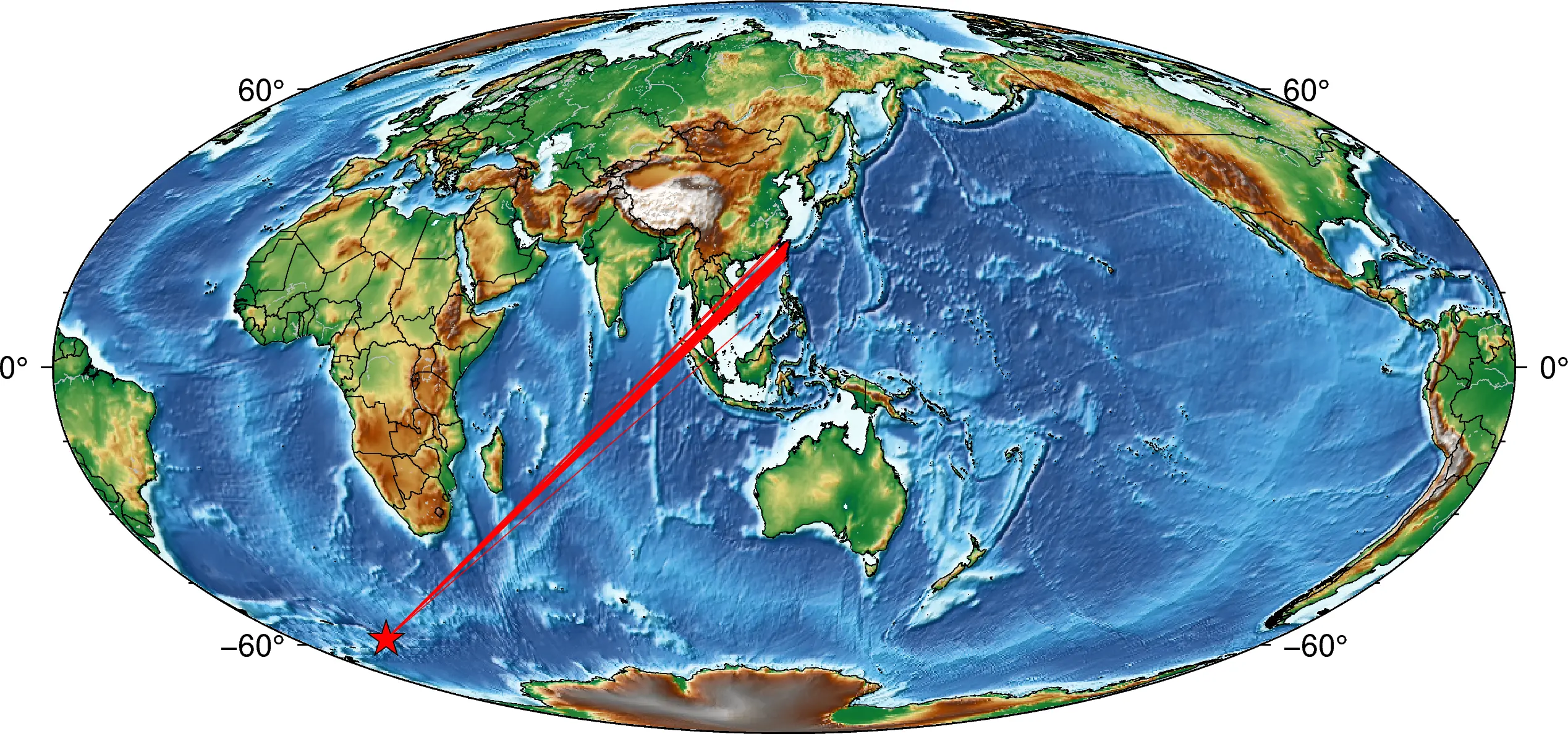
Here, I used the Mollweide projection but this code can be applied for any other projections with a little tweak.

The first few lines of the data file are:

network,station,channel,stla,stlo,stel,evla,evlo,evdp,starttime,endtime,samplingRate,dist,baz
TW,GWUB,HHZ,24.5059,121.1131,2159.0,-58.5981,-26.4656,164.66,2018-12-11T02:25:32.000002Z,2018-12-11T03:56:31.990002Z,100.0,15445.41,205.14
TW,LXIB,HHZ,24.0211,121.4133,1327.0,-58.5981,-26.4656,164.66,2018-12-11T02:25:32.000000Z,2018-12-11T03:56:31.990000Z,100.0,15409.58,204.75
TW,VCHM,HHZ,23.2087,119.4295,60.0,-58.5981,-26.4656,164.66,2018-12-11T02:25:32.000000Z,2018-12-11T03:56:31.990000Z,100.0,15242.27,205.4
TW,VDOS,HHZ,20.701,116.7306,5.0,-58.5981,-26.4656,164.66,2018-12-11T02:25:32.000000Z,2018-12-11T03:56:31.990000Z,100.0,14871.63,205.6
TW,VNAS,HHZ,10.3774,114.365,2.0,-58.5981,-26.4656,164.66,2018-12-11T02:25:32.000000Z,2018-12-11T03:56:31.990000Z,100.0,13726.26,203.23
TW,VWDT,HHZ,23.7537,121.1412,2578.0,-58.5981,-26.4656,164.66,2018-12-11T02:25:32.000000Z,2018-12-11T03:56:31.990000Z,100.0,15371.08,204.77
TW,VWUC,HHZ,24.9911,119.4492,42.0,-58.5981,-26.4656,164.66,2018-12-11T02:25:32.000000Z,2018-12-11T03:56:31.990000Z,100.0,15420.85,206.25
TW,YD07,HHZ,25.1756,121.62,442.0,-58.5981,-26.4656,164.66,2018-12-11T02:25:32.000000Z,2018-12-11T03:56:31.990000Z,100.0,15534.34,205.2
TW,HOPB,HHZ,24.3328,121.6929,160.0,-58.5981,-26.4656,164.66,2018-12-11T02:25:32.003130Z,2018-12-11T03:56:31.993130Z,100.0,15452.83,204.75
TW,SYNB,HHZ,23.2482,120.9862,2352.0,-58.5981,-26.4656,164.66,2018-12-11T02:25:32.003131Z,2018-12-11T03:56:31.993131Z,100.0,15313.6,204.62
TW,DYSB,HHZ,24.8208,121.4049,1000.0,-58.5981,-26.4656,164.66,2018-12-11T02:25:32.008393Z,2018-12-11T03:56:31.998393Z,100.0,15489.54,205.14
TW,FUSB,HHZ,24.7597,121.5875,690.0,-58.5981,-26.4656,164.66,2018-12-11T02:25:32.008394Z,2018-12-11T03:56:31.998394Z,100.0,15491.23,205.01
TW,HGSD,HHZ,23.4921,121.4239,134.8,-58.5981,-26.4656,164.66,2018-12-11T02:25:32.008393Z,2018-12-11T03:56:31.998393Z,100.0,15356.77,204.5
---

References

  1. Uieda, L., Wessel, P., 2019. PyGMT: Accessing the Generic Mapping Tools from Python. AGUFM 2019, NS21B–0813.
  2. Wessel, P., Luis, J.F., Uieda, L., Scharroo, R., Wobbe, F., Smith, W.H.F., Tian, D., 2019. The Generic Mapping Tools Version 6. Geochemistry, Geophys. Geosystems 20, 5556–5564. https://doi.org/10.1029/2019GC008515
Utpal Kumar
Utpal Kumar

Geophysicist | Geodesist | Seismologist | Open-source Developer
I am a geophysicist with a background in computational geophysics, currently working as a postdoctoral researcher at UC Berkeley. My research focuses on seismic data analysis, structural health monitoring, and understanding deep Earth structures. I have had the opportunity to work on diverse projects, from investigating building characteristics using smartphone data to developing 3D models of the Earth's mantle beneath the Yellowstone hotspot.

In addition to my research, I have experience in cloud computing, high-performance computing, and single-board computers, which I have applied in various projects. This includes working with platforms like AWS, GCP, Linode, DigitalOcean, as well as supercomputing environments such as STAMPEDE2, ANVIL, Savio and PERLMUTTER (and CORI). My work involves developing innovative solutions for structural health monitoring and advancing real-time seismic response analysis. I am committed to applying these skills to further research in computational seismology and structural health monitoring.

Articles: 47

97 Comments

  1. Hello, I do believe your website might be having internet browser compatibility issues. Whenever I look at your web site in Safari, it looks fine however, when opening in IE, it has some overlapping issues. I merely wanted to give you a quick heads up! Aside from that, wonderful website!

  2. My developer is trying to convince me to move to .net from PHP. I have always disliked the idea because of the costs. But he’s tryiong none the less. I’ve been using WordPress on numerous websites for about a year and am nervous about switching to another platform. I have heard fantastic things about blogengine.net. Is there a way I can import all my wordpress posts into it? Any help would be really appreciated!

  3. Thanks for every other informative website. The place else may just I am getting that kind of information written in such a perfect approach? I’ve a undertaking that I am simply now working on, and I’ve been on the look out for such information.

  4. I have been browsing online more than 3 hours today, yet I never found any interesting article like yours. It is pretty worth enough for me. Personally, if all web owners and bloggers made good content as you did, the internet will be a lot more useful than ever before.

  5. Hello! I know this is somewhat off topic but I was wondering which blog platform are you using for this site? I’m getting sick and tired of WordPress because I’ve had issues with hackers and I’m looking at options for another platform. I would be great if you could point me in the direction of a good platform.

  6. Hello there! I know this is kinda off topic however I’d figured I’d ask. Would you be interested in trading links or maybe guest writing a blog post or vice-versa? My blog addresses a lot of the same topics as yours and I feel we could greatly benefit from each other. If you are interested feel free to shoot me an e-mail. I look forward to hearing from you! Excellent blog by the way!

  7. I have been exploring for a little for any high quality articles or weblog posts on this kind of space . Exploring in Yahoo I at last stumbled upon this web site. Reading this information So i am glad to show that I’ve an incredibly just right uncanny feeling I found out exactly what I needed. I most indubitably will make certain to don?t overlook this site and provides it a look regularly.

  8. Simply want to say your article is as surprising. The clearness in your put up is just cool and that i can think you’re knowledgeable in this subject. Fine together with your permission allow me to clutch your feed to stay up to date with drawing close post. Thank you a million and please continue the gratifying work.

  9. Howdy, i read your blog occasionally and i own a similar one and i was just wondering if you get a lot of spam comments? If so how do you reduce it, any plugin or anything you can recommend? I get so much lately it’s driving me crazy so any support is very much appreciated.

  10. you’re in point of fact a good webmaster. The website loading velocity is amazing. It kind of feels that you are doing any distinctive trick. Moreover, The contents are masterpiece. you have done a fantastic activity in this topic!

  11. Hello! I could have sworn I’ve been to this website before but after checking through some of the post I realized it’s new to me. Anyhow, I’m definitely delighted I found it and I’ll be book-marking and checking back often!

  12. May I simply say what a comfort to discover somebody who actually understands what they’re talking about online. You definitely know how to bring an issue to light and make it important. A lot more people have to check this out and understand this side of the story. I was surprised you’re not more popular given that you certainly have the gift.

  13. Fascinating blog! Is your theme custom made or did you download it from somewhere? A design like yours with a few simple tweeks would really make my blog jump out. Please let me know where you got your design. Thank you

  14. It’s a shame you don’t have a donate button! I’d without a doubt donate to this superb blog! I guess for now i’ll settle for bookmarking and adding your RSS feed to my Google account. I look forward to new updates and will share this website with my Facebook group. Talk soon!

  15. I have been surfing on-line greater than three hours today, but I by no means discovered any fascinating article like yours. It is beautiful value sufficient for me. In my opinion, if all website owners and bloggers made just right content as you did, the internet will probably be much more helpful than ever before.

  16. I’m impressed, I have to admit. Seldom do I come across a blog that’s both equally educative and entertaining, and without a doubt, you’ve hit the nail on the head. The problem is something that too few men and women are speaking intelligently about. Now i’m very happy I found this during my hunt for something relating to this.

  17. Hello would you mind sharing which blog platform you’re using? I’m looking to start my own blog soon but I’m having a tough time choosing between BlogEngine/Wordpress/B2evolution and Drupal. The reason I ask is because your design seems different then most blogs and I’m looking for something completely unique. P.S My apologies for being off-topic but I had to ask!

  18. Hello there! I could have sworn I’ve visited your blog before but after going through some of the articles I realized it’s new to me. Regardless, I’m definitely pleased I discovered it and I’ll be book-marking it and checking back often!

  19. I’m really impressed together with your writing talents and also with the layout in your blog. Is this a paid topic or did you customize it your self? Either way stay up the nice quality writing, it is rare to look a great blog like this one today..

  20. Very great post. I simply stumbled upon your blog and wished to mention that I’ve really loved surfing around your weblog posts. In any case I will be subscribing on your feed and I’m hoping you write once more soon!

  21. I would like to thank you for the efforts you’ve put in writing this website. I really hope to see the same high-grade blog posts from you later on as well. In fact, your creative writing abilities has inspired me to get my very own site now 😉

  22. May I simply just say what a comfort to find a person that truly understands what they’re discussing on the web. You definitely understand how to bring an issue to light and make it important. More people really need to look at this and understand this side of the story. I can’t believe you aren’t more popular given that you certainly have the gift.

  23. When I initially commented I clicked the “Notify me when new comments are added” checkbox and now each time a comment is added I get four emails with the same comment. Is there any way you can remove me from that service? Appreciate it!

  24. Hmm is anyone else having problems with the pictures on this blog loading? I’m trying to determine if its a problem on my end or if it’s the blog. Any suggestions would be greatly appreciated.

  25. Please let me know if you’re looking for a article author for your weblog. You have some really great articles and I feel I would be a good asset. If you ever want to take some of the load off, I’d absolutely love to write some content for your blog in exchange for a link back to mine. Please shoot me an email if interested. Cheers!

  26. Undeniably believe that that you said. Your favourite reason appeared to be on the net the simplest factor to be aware of. I say to you, I certainly get irked while other people think about issues that they plainly do not recognise about. You managed to hit the nail upon the top and defined out the entire thing with no need side effect , people could take a signal. Will likely be again to get more. Thanks

  27. Hey I know this is off topic but I was wondering if you knew of any widgets I could add to my blog that automatically tweet my newest twitter updates. I’ve been looking for a plug-in like this for quite some time and was hoping maybe you would have some experience with something like this. Please let me know if you run into anything. I truly enjoy reading your blog and I look forward to your new updates.

  28. After looking into a few of the blog articles on your website, I seriously appreciate your way of writing a blog. I added it to my bookmark webpage list and will be checking back in the near future. Please visit my web site as well and tell me how you feel.

  29. Hello would you mind letting me know which hosting company you’re utilizing? I’ve loaded your blog in 3 different web browsers and I must say this blog loads a lot quicker then most. Can you recommend a good internet hosting provider at a honest price? Kudos, I appreciate it!

  30. When I initially left a comment I appear to have clicked on the -Notify me when new comments are added- checkbox and from now on each time a comment is added I receive 4 emails with the exact same comment. There has to be an easy method you are able to remove me from that service? Thank you!

  31. May I simply say what a comfort to discover someone that really knows what they are talking about on the web. You actually understand how to bring an issue to light and make it important. More and more people should look at this and understand this side of your story. I can’t believe you’re not more popular given that you definitely possess the gift.

  32. Good day! I know this is kinda off topic however , I’d figured I’d ask. Would you be interested in trading links or maybe guest authoring a blog article or vice-versa? My site addresses a lot of the same topics as yours and I think we could greatly benefit from each other. If you happen to be interested feel free to shoot me an e-mail. I look forward to hearing from you! Fantastic blog by the way!

  33. Having read this I believed it was very informative. I appreciate you taking the time and effort to put this information together. I once again find myself personally spending a lot of time both reading and posting comments. But so what, it was still worthwhile!

  34. Greetings, There’s no doubt that your web site could be having internet browser compatibility problems. Whenever I take a look at your web site in Safari, it looks fine however, when opening in Internet Explorer, it’s got some overlapping issues. I just wanted to provide you with a quick heads up! Aside from that, excellent blog!

  35. I’ve been exploring for a little bit for any high quality articles or blog posts on this kind of space . Exploring in Yahoo I at last stumbled upon this website. Reading this information So i’m glad to exhibit that I have an incredibly just right uncanny feeling I discovered just what I needed. I most undoubtedly will make sure to don?t disregard this site and give it a look regularly.

Leave a Reply

Your email address will not be published. Required fields are marked *